Choose billing cycle:
Email & Cloud Storage
AI Powered Gmail
Get Gmail with Gemini AI assistance
AI powered Apps
Get Gemini AI assistance in docs, sheets, slides, drive, chat. Create videos using Google Vids
AI Research Assitant
Unlock insights and create audio notes with NotebookLM
Mailbox Migrations
We'll move your current emails over to your new account.
Gmail
Use the world's easiest email app, Gmail.
Calendar
Drive
Docs
Sheets
Slides
Keep
Hangouts
Forms
Customer service and support
Free Setup
24x7 Phone Support
We provide 24x7x365 support to help you day and night.
24×7 Email Support
We provide 24x7x365 support to help you day and night.
Spam Protection
Email spam protection keeps your mailbox junk-free.
Forwarding
Auto-responder
Catch-all email address
Schedule Sending
iPhone App
Android App

Google Workspace Business Standard

$21.90/mo
$21.90/mo
$262.80
$21.90/mo
$525.60
$21.90/mo
$788.40
Upgraded 2TB storage for power users.
More options available at checkout
2TB
Included
Included
Included
$49 per Mailbox
Included
Included
Included
Included
Included
Included
Included
Included
Included
 Support
Included
Included
Included
Included
 Specs
Included
Included
Included
Included
Included
Included

Google Docs

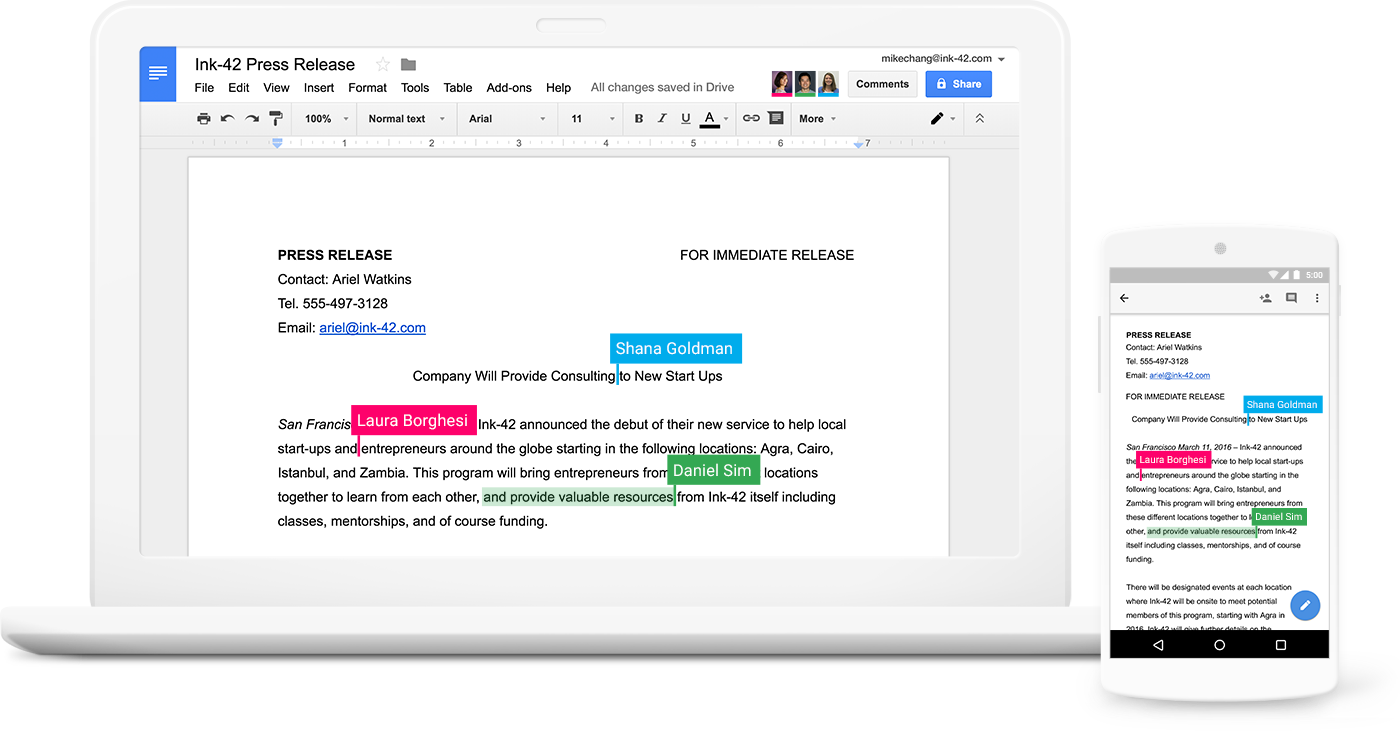
Collaborate in real-time with your team, family and friends.

Google Workspace offers a powerful suite of applications that completely replaces any need for desktop publishing software. Whether you need to create or edit documents, spreadsheets or slideshows, Google Workspace offers an online application to fit the bill. Never pay expensive software licenses, or have to run program updates ever again!

With Google Workspaces built-in auto-saving feature, you’ll never lose your work again, with everything saved automatically in the cloud as you go. Should you ever need to go back, Google Workspace also offers a full revision history feature, allowing you to refer back to how your document was days, months or even years ago!

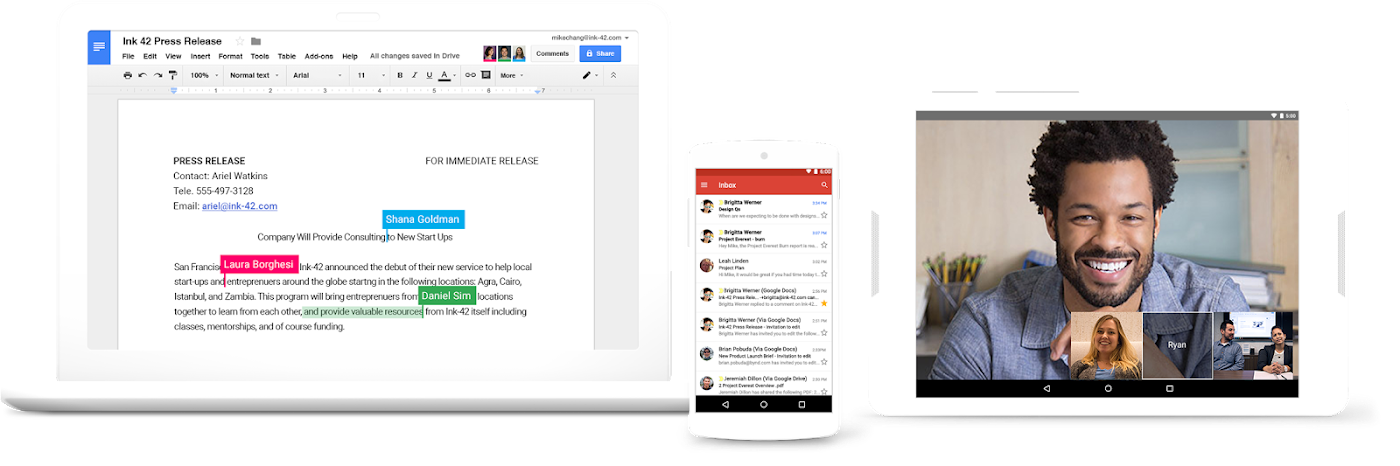
Perhaps one of the most beneficial features of using online applications over traditional desktop publishing software is the ability to work simultaneously with others on the same documents. With Google Google Workspace, you and your team, friends or family can have the same document open at the same time, make edits and see each other’s changes in real-time. Comment, chat, make suggestions as you go and save yourself from the back and forth hassle of attaching documents to emails.

So how does it all work? Essentially, using Google Workspace applications has the same look and feel that you’re likely already familiar with. However, instead of opening an application such as Microsoft Word on your computer, you simply access Google Workspace’s ‘Docs’ application through your favourite web browser. Instead of saving documents to your computer’s hard drive, all of your work will be stored online. So no matter whether your regular computer breaks down, or you’re travelling overseas, your data will always be securely stored online, ready for you to access anytime, from any place.

And finally, you can say goodbye to attaching documents to emails to share them with other people. With Google Workspace, you can simply share your documents, spreadsheets and slideshows directly with your recipients, who will receive a link to access your work online. You can choose whether to allow them read-only or edit permissions and can also revoke access entirely at any time. Best of all, your recipients don’t need to be Google Workspace users to access and collaborate on your documents – although, with all of these awesome benefits, they might just want to jump aboard too!

Read More

Plan your life with Google Calendar.

Dinner date on Thursday? Dentist appointment on Friday morning? Rock concert next month? Aside from the dentist perhaps, these are plans you just don’t want to forget! With Google Calendar, you can free up your headspace and have peace of mind knowing you’ll never forget an important date ever again.

If you’re using Google Calendar with your work team, the built-in calendar sharing features can help you to stay on top of your team’s schedules, track project deadlines and plan ahead. Create collaborative team calendars to suit your workflow, or invite specific colleagues to view your own schedule, and cut out the back and forth planning once and for all!

Keep track of your schedule, important dates and recurring reminders by taking your calendar with you in your pocket, wherever you go. Google Calendar is available across all of your devices, either through your web browser, your favourite calendar app, or the dedicated Google Calendar app for Android and iOS mobile devices. No matter how and where you access your calendar, your events and reminders will sync across all of your devices instantly, ensuring you’re always on top of your day.

With Google Calendar, you’ll be able to set up recurring daily, monthly, yearly (or anything in between!) reminders to ensure you never forget to buy an anniversary present on time, meet up with your friends, change your toothbrush or wish your Gran a happy birthday!

Google Calendar gives you the freedom to instantly offload the important things you need to remember while on the go. Simply open the app and create a new once-off or recurring event and you’re set! Streamline your life and spend more time in the moment with your schedule stored safely and securely in the cloud, ready at your fingertips whenever you need to check.

Read More

More Google Workspace Features

Please select:

Teamwork

Secure, private, ad-free email for your business

Gmail keeps you updated with real-time message notifications, and safely stores your important emails and data. IT admins can centrally manage accounts across your organization and devices.

Make decisions faster, face to face.

Use shared calendars to see when others are available and schedule meetings with automatic email invites.

Collaborate in real-time.

Easily work on documents, spreadsheets, and slides across your devices, with or without internet.

Store and share files in the cloud.

Keep all your work in one place with secure access from your computer, phone, or tablet.

Secure your data and devices.

Protect your company’s data with security options like 2-step verification and single-sign-on, and use mobile management to keep your data safe in the case of a lost device or employee turnover.

In the clouds

Work in the cloud with your whole team

Google is defining the way businesses use the cloud, offering simplicity, compatibility, security, and a continuously updated library of applications to make doing business better.

Digital Pacific’s setup and support services ensure you are properly set up, that you enjoy a smooth transition, and that you and your employees have all the training and resources you need to fully take advantage of the benefits of Google Workspace.

  • With 30GB of Google Drive cloud storage and free, mobile-friendly apps for iOS and Android, you’ll always have your important files within reach.
  • Full-featured, cloud-based apps let you create and share professional documents, spreadsheets, presentations, and more.
  • Google Workspace gives you more ways to collaborate. Share documents, video conferences, instant messages, and more – all through your own custom domain.

All in one suite

Do your best work, all in one suite

Compatible with your existing interface

Gmail works great with desktop clients like Microsoft Outlook, Apple Mail and Mozilla Thunderbird. Outlook users can sync emails, events and contacts to and from Google Workspace.

Easy migration from Outlook and legacy services

Migrate your email from Outlook, Exchange or Lotus easily with custom tools that help preserve your important messages.

99.9% guaranteed uptime, 0% planned downtime

Count on Google’s ultra-reliable servers to keep your lights on 24/7/365. Automatic backups, spam protection and industry-leading security measures help protect your business data.

Mailbox migrations

Want to migrate your mailbox to Google Workspace? We can help!

We can help migrate your mailbox from another hosting provider, from Office 365, or even from another Google Workspace account to Digital Pacific’s Google Workspace service. Our 24×7 Rapid Support team will migrate all of your precious emails and folders to Google Workspace for the low cost of $49 per mailbox. This service is managed completely by our specialised team and the migration can be completed in just a few hours.

This service is managed completely by our specialised team and the migration can be completed in just a few hours. All you need to provide is your email username and password and our team will take care of the rest. Once the mailbox migration is complete, we can even help update your DNS so you can get started on Google Workspace faster. It’s simply easier with Digital Pacific.

What support is included?

 
Admin account setup
DNS updates (If domain with us)
Manage users (create, delete, suspend)
Manage forwarders & aliases
Manage user permissions
Admin console customisation
Password resets
Setting up apps on a user’s phone or computer
Adding, editing or customising signatures
Assistance with using or configuring Gmail or Outlook
Assistance with using or configuring Drive or OneDrive
Assistance with using G Suite or Office 365 Apps
Create, edit, delete or share documents
Setup or support third party applications

Google Workspace Basic

Price includes 1 Google Workspace user.
Included
Included
Included
Included
Included
Not Available
Not Available
Not Available
Not Available
Not Available
Not Available
Not Available
Not Available
Not Available

Google Workspace Business

Upgraded 1TB storage for power users.
Included
Included
Included
Included
Included
Included
Included
Not Available
Not Available
Not Available
Not Available
Not Available
Not Available
Not Available

Need more information?

Digital Pacific and Google make a powerful team. On the one hand, you get the world’s leading cloud-based office suite – already used successfully by millions of businesses around the world – and on the other, you have Digital Pacific’s award-winning support, setup, training, and cloud expertise to draw on whenever you need it.

More and more businesses are moving to Google Workspace every day. They all have their own reasons, but here are some of the most common:

  • Lower costs: No in-house servers or software to maintain and upgrade.
  • Mobility: Access your files from anywhere with an Internet connection.
  • Compatibility: PCs, Macs, laptops, smartphones, and tablets all work together.
  • Seamless teamwork: People in different locations can work on the same document, at the same time.
  • Security and reliability: 99.9% uptime – you may never lose a file again!

Google Workspace accesses and fully draws upon the power of cloud computing. It’s a new way of working that leaves behind the old frustrations of outdated software, expensive licenses, hardware maintenance, incompatibility, lost files, email attachments, and more.

With Google Workspace, all your files and data, including emails, calendars, and presentations are stored in the cloud – and so are your software tools and applications. All you need to get to work is an Internet-enabled device and a connection.

Google Workspace For Work™

An easy-to-use email application providing customizable email (you@yourcompany.com) and 30GB of storage for each account. Includes powerful email searches, instant messaging, and advanced spam filters.

Google Calendar™

Quickly organize busy schedules, view colleagues’ calendars, set up meetings, send invitations, and publish shared calendars to the web.

Google Docs, Sheets, Slides, Forms, and more

Create documents, spreadsheets, slideshows, or drawings. Users can collaborate on these documents and presentations online in real-time.

Google Drive

Safe and secure cloud-based storage for any business.

Google Hangouts

Video conferencing for your business. Up to 15 people can connect, share documents and screens in real time.

Three words: simplicity, accessibility, and cost.

Google Workspace is easy to use. Google Workspace offers an intuitive, easy-to-use interface. Minimal training will be needed for end users, and Digital Pacific has everything you need to make the transition.

Google Workspace is accessible anywhere, anytime. Unlike an on-premises mail solution, Google Workspace email (Gmail) is available from any web browser. This gives you complete access to your contacts, sent mail, archives, settings, chat window, and more. Documents and calendars are also available from any Internet-enabled device. Communication is easy – you are no longer tied down to a single desktop computer or one server.

Google Workspace will save you money. With Google Workspace, you no longer have to worry about license costs, maintaining mail servers (or server rooms), updates, and so on. There is no hardware to buy or software to upgrade. You can also let someone else – namely the experts at Google – worry about maintaining high security standards (the best in the world) and reliability (99.9% uptime guaranteed).

Google Workspace Basic Google Workspace Business
Admin account setup Yes Yes
DNS updates (If domain with us) Yes Yes
Manage users (create, delete, suspend) Yes Yes
Manage forwarders & aliases Yes Yes
Manage user permissions Yes Yes
Admin console customisation No Yes
Password resets No Yes
Setting up apps on a user’s phone or computer No No
Adding, editing or customising signatures No No
Assistance with using or configuring Gmail or Outlook No No
Assistance with using or configuring Drive or OneDrive No No
Assistance with using Google Workspace or Office 365 Apps No No
Create, edit or delete or share documents No No
Setup or support third party applications No No


Prefer to use Office 365 and Outlook?

Need Web Hosting with that?

Google Workspace email hosting

Google Workspace email hosting is a service we provide for small and medium sized businesses throughout Australia. Proudly Australian owned, we are committed to bringing our clients reliable, trustworthy and affordable web hosting and email hosting. If you are looking for a powerhouse of computing tools, communication and collaboration tools, the ability to share central files store in a cloud-based server, then Google Workspace for business is the program that offers you all of that with the expense of maintaining servers or purchasing expensive hardware and software programs.

How many email addresses can I have with a Google Workspace?

Google offers the world’s leading cloud-based office suite with everything your business needs to connect, stay informed, share documents, manage calendars and reliably access your email from anywhere in the world. We have partnered with Google to develop a scalable Google Workspace email hosting service which allows you to seamlessly migrate across your existing users or generate a new cloud- based storage. For information about storage capacity such as unlimited storage, Google Workspace users and power users, and what size hosting your business needs, contact our Australian based customer service either online or on 1300 694 678.

Currently, when you set up Google Workspace for your business, you are permitted 30 Google business mail aliases per Google Workspace user.

How to transfer email to Google Workspace?

Our email hosting services includes the ability to seamlessly migrate your current business email to our cloud storage Google Workspace email hosting when you make the switch to Digital Pacific. We offer you affordable and scalable monthly plans designed for businesses and users of all sizes. As part of your switch over to Digital Pacific, we call also manage the entire migration of your services so everything occurs quietly and behind-the-scenes. You can schedule your business email migration at a time which suits you, minimising interruptions to staff and business activities.

You can also purchase levels of technical support and administration tailored specifically for Google Workspace affordability and ease of use. We are committed to providing our clients reliable and efficient services for the best price available.

How to add more emails to a Google Workspace?

To setup gmail accounts or remove them, you will require Administrator level access to your gmail suite. We can set up your administrator account when you switch your services over to us and ensure that you understand how the Google Workspace works, how to set up a new company email address and manage your users. If you would like Digital Pacific to manage your Google Workspace account by creating new email addresses and users, you can upgrade your services to our Google Workspace Business package.

How do I access my Google Workspace email?

The Google drive, company email, documents and word processing applications all live in the Google cloud. Our Google Workspace email hosting services mean that we manage the hosting of your entire Google Workspace including computing tools, Google hangouts, cloud emails, etc. Access to your available programs, including your custom email address, can be accessed via the Google Workspace app on mobile devices, desktop and laptop computers. All you need in an internet connection.

Cloud based storage ensures that everybody, no matter where they are, has reliable access to shared company emails, calendars, documents and storage drives.

To learn how your business can move to Google Workspace email hosting from Digital Pacific, browse our available business packages online or chat with a consultant on 1300 694 678. Our Australian based team can help you understand the differences between your Google Workspace account and programs like Microsoft Outlook, explain what level of spam protection is available and how your spam filters would, as well as advise the best and most efficient ways of migrating your services to us.